
The Ultimate Guide to Customizing Your Miniature Poses
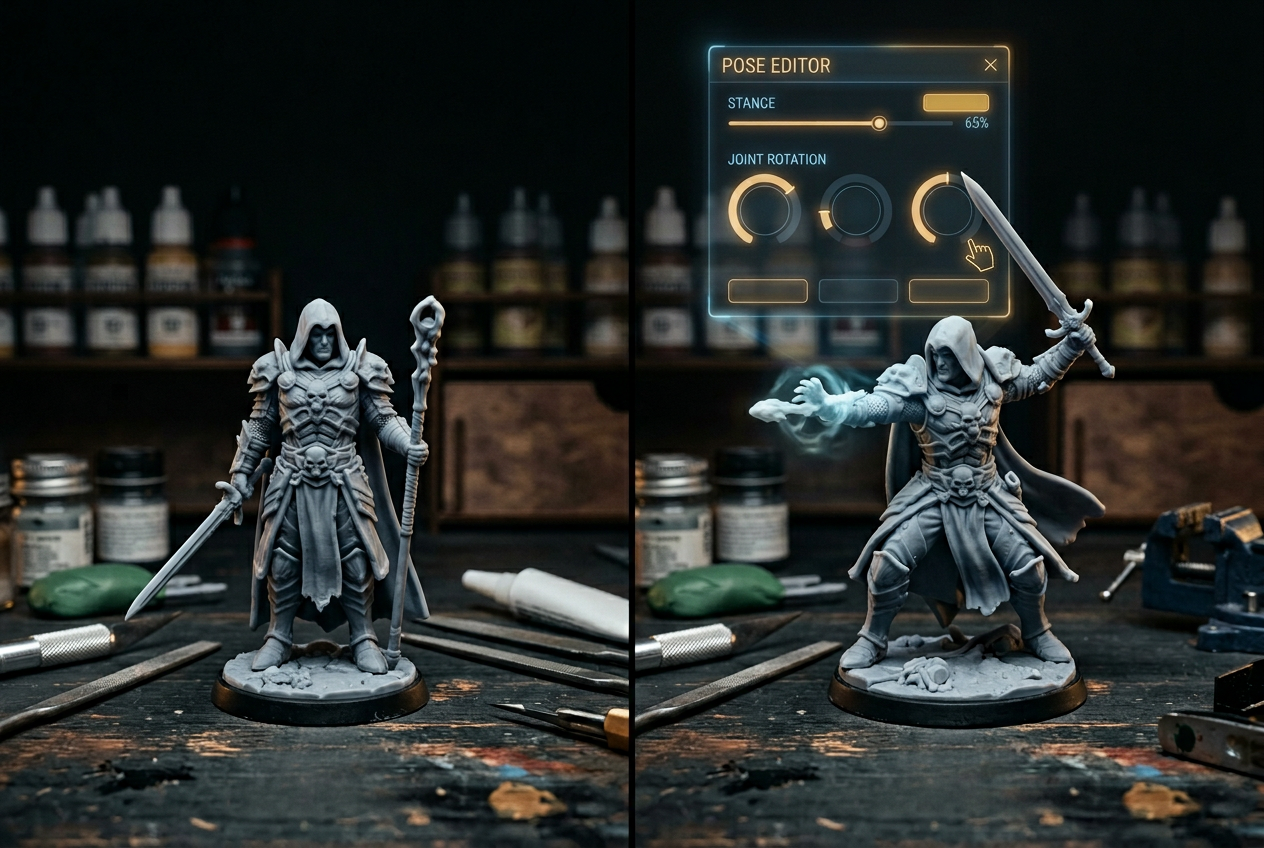
The Ultimate Guide to Customizing Your Miniature Poses
Your miniature's pose tells a story before anyone rolls initiative. A crouching rogue, a wizard mid-incantation, a warrior bracing for impact—each stance communicates character in ways that paint schemes and equipment choices simply can't match.
This guide covers everything from digital stance selection to physical reposing techniques, helping you create miniatures that look exactly the way you imagine them at the table.
What is miniature pose customization
Pose customization means adjusting a miniature's stance, limb positions, and body orientation so the figure matches your character concept. You can approach pose customization two ways: through digital character creators where you select a stance before printing, or through physical conversion where you cut and reposition parts of an existing model with hobby tools and modeling putty.
Digital pose selection works well if you want predictable results without hands-on sculpting. Physical reposing appeals to hobbyists who enjoy the craft of cutting, repositioning, and filling gaps with green stuff (a two-part modeling putty that hardens after mixing).
Why custom poses make your miniatures stand out
Show off your character's personality
A miniature's pose communicates character before anyone reads a backstory or rolls dice. Picture the difference between a rogue crouching mid-sneak versus a paladin standing tall with sword raised—each pose tells you something about who that character is and how they move through the world.
Create memorable tabletop moments
Dynamic poses catch attention during play. When your wizard stands with arms outstretched while everyone else uses generic standing figures, your character becomes instantly recognizable across a crowded battle map. That visual distinction elevates your game during long sessions.
Avoid generic monopose miniatures
"Monopose" describes miniatures locked into one fixed position with no adjustment options. If you've ever bought a box of figures and noticed they all look identical, you've encountered monopose design. Custom pose selection solves this by letting you choose exactly how your miniature presents itself—no more settling for whatever the manufacturer decided.
Digital vs physical methods for customizing miniature poses
Two paths exist for customizing poses, and each suits different skill levels and goals.
MethodBest ForTools NeededDigital (online creators)Beginners, precise controlBrowser, 3D printer or order servicePhysical (reposing/conversion)Experienced hobbyistsHobby knife, green stuff, glue
Online character creators and 3D miniature tools
Browser-based creators let you select stance settings, preview your pose in real time, and then download the file for printing or order a finished miniature.
The ANVL platform, for example, organizes creation around clear sections (Race, Head, Clothing, Body, Hand Held Items, Unique Bases) so you always know where you are in the process. You pick a stance, adjust details, and preview everything before committing.
Start Building Your Custom Miniature →
Stance and pose options for fantasy miniatures
"Stance" refers to your miniature's overall body position—the foundation everything else builds upon. Most character creators offer several core options, and understanding what each communicates helps you make better choices.
Standing idle and neutral poses
Neutral poses offer versatility above all else. A standing idle miniature fits equally well on a display shelf, in a dungeon encounter, or during roleplay-heavy sessions—and these miniatures are compatible with any tabletop game. In ANVL's creator, you'll find this listed as "Standing Idle" in the Stance dropdown.
Action and combat ready poses
Combat stances show movement or attack positioning—a sword mid-swing, a shield braced for impact. Warrior classes and martial characters often benefit from combat-ready poses that communicate their role at a glance. If your character spends most sessions in the thick of battle, an action pose makes sense.
Spellcasting and dramatic poses
Wizards, clerics, and warlocks come alive with outstretched arms and mystical gestures. Spellcasting poses add theatrical flair and help distinguish your caster from the fighters and rogues around them. Even if your character only casts one spell per session, the pose tells everyone what they're capable of.
How to customize your miniature pose
1. Pick your race and gender
Simply navigate to the "Race" section and select from options like Human, Elf, Tiefling, or creature types like Dragon, Minotaur, or Treant. Male and female variants appear side by side for easy comparison. ANVL offers seventeen race options ranging from classic fantasy (Dwarf, Orc, Halfling) to creature types (Cat, Wolf, Frog, Eagle) and elementals (Crystal).
2. Select your stance setting
Choose your pose from the "Stance" dropdown. The current selection appears on screen (for example, "Standing Idle"), so you always know what you're working with. Changing stance updates the preview immediately.
3. Fine tune body and head position
Use the incremental controls (+ / -) to adjust proportions with precision. The Head section shows a percentage value you can tweak in small steps—no dramatic jumps required. This level of control lets you dial in exactly the look you want.
4. Add weapons and hand held items
Hand-held items affect how your final pose reads. A raised staff suggests different intent than a lowered sword, and dual-wielded axes communicate something else entirely. Simply navigate to "Hand Held Items" to equip your character.
5. Preview and save your custom miniature
Ready to finish? Simply select "Save," "Add to Cart," or "Download" depending on what you want to do next. The preview shows exactly how your miniature will look before you commit to anything.
Tips for choosing the right pose for your character
Match the pose to class and playstyle
A fighter benefits from combat-ready stances that emphasize strength. A bard might suit a dramatic gesture suggesting performance. A monk could work well in a balanced, centered pose. Think about what your character does most often, then choose a pose that reflects that role.
Consider base size and tabletop visibility
Extended limbs and dynamic poses look impressive but may affect how your miniature fits on its base. The "Size" setting (typically "Standard") helps maintain scale consistency across your collection. If you're building a party, keeping everyone at the same size prevents awkward mismatches during play.
Use random generation to spark ideas
Feeling stuck? The "Generate a random character" feature combines unexpected race and configuration choices that might inspire directions you hadn't considered. You can always refine the result afterward—random generation works best as a starting point rather than a final answer.
Customizing poses for different races and creature types
Body structure affects how poses translate visually. A combat stance on a Minotaur carries different visual weight than the same pose on a Human, and understanding these differences helps you make better choices.
Classic fantasy races
Human, Dwarf, Elf, Halfling, and Tiefling miniatures share humanoid proportions, which means all stance options work predictably. Classic races like custom Dwarf miniatures offer the most flexibility for pose experimentation since the body shapes are familiar and well-understood.
Monstrous and non-humanoid characters
Cyclops, Minotaur, and Skeleton builds have unique proportions that change how poses read. A Skeleton's lack of muscle mass makes certain action poses look different than they would on a living character. Monstrous races often benefit from poses that emphasize their distinctive features.
Animalfolk and elemental creatures
Cat, Wolf, Frog, Eagle, Crystal, Treant, and Dragon options feature distinct silhouettes. Pose selection becomes especially important here because unusual body shapes make each stance choice more visually impactful. An Eagle character in a spellcasting pose, for instance, reads very differently than a Human in the same stance.
Enhancing your pose with unique bases and accessories
Bases that complement your stance
A rocky outcrop suits a triumphant victory pose. Dungeon flagstones work well for combat-ready stances. Forest terrain matches a ranger's sneaking pose. Simply navigate to the "Unique Bases" section to find options that match your miniature's mood and setting.
The base tells part of your character's story, so choosing one that complements your pose creates a more cohesive final result.
Equipment that completes the look
Weapons, shields, and held items add context that reinforces your pose choice. A spellcaster with a glowing staff reads differently than one with empty hands. Explore both "Hand Held Items" and "Clothing" sections to complete your character's visual story—small details like armor style or cape placement can make a big difference.
Start building your custom miniature pose today
With ANVL's guided creation flow, you can customize race, stance, equipment, and details in one seamless experience. When you're finished, simply save your design, add it to cart, or download the .STL file for printing at home.
Start Building Your Custom Miniature →
Sound like fun? It is!
FAQs about customizing miniature poses
Can I change my miniature's pose after I start building?
Yes—ANVL's step-by-step flow lets you return to the "Stance" section and adjust your pose anytime before saving or ordering. Nothing locks in until you're ready to commit.
What file format do I receive when I download a custom miniature?
You receive an .STL file, which is the standard format for resin 3D printing. This file works with popular slicers like Cura, Lychee, or Chitubox for preparing your print.
Do pose options vary depending on race or creature type?
Pose settings apply across all races, though body structure affects how the stance appears visually. A "Standing Idle" pose looks different on a Dragon than on an Elf due to the difference in body proportions.
Can I customize poses for characters with mounts?
Yes—use the "Mount" setting to add or remove a mount. The character's pose adjusts to fit the mounted or unmounted state automatically, so you don't have to worry about awkward positioning.
How do I know my custom pose will print correctly in resin?
ANVL's preview shows exactly how your miniature will look, and the resin material setting ensures your design is optimized for high-detail 3D printing. What you see on screen is what you get in your hands.

